
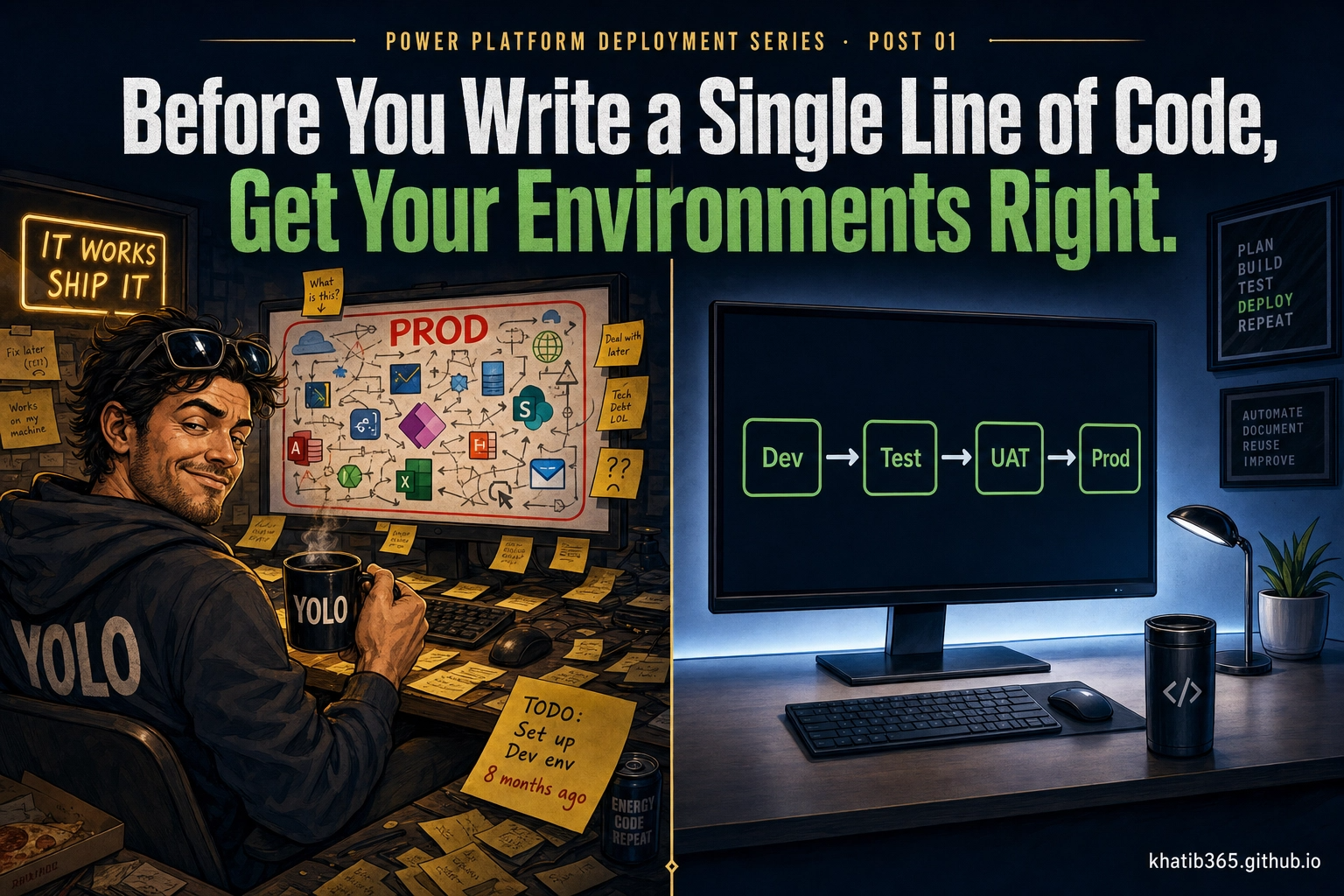
You've been on this project for months. Requirements workshops, design sessions, sprint reviews. The client has seen the app evolve week by week. They've given feedback, you've incorporated it. Then came UAT: business users testing real scenarios, raising issues, you fixing them, another round, sign-off. Weeks of that.
And then the email arrives. "We're ready to go live."
You open the Admin Center to prepare the production environment. And that's when you start finding the decisions nobody made.
The UAT environment has no security group. Which means every licensed user in the tenant has had access to it for six months. Including the client's CEO, who logged in three weeks ago during a particularly rough sprint and saw screens nobody was ready to show him. You found out about it in a very uncomfortable call.
The client just asked about adding Dynamics 365 Sales to the solution. You go back to the environment settings and find the toggle that was never enabled at creation time, the one that can't be turned on now. The one that means recreating the environment from scratch, migrating everything, and updating every integration. Weeks of work. No new functionality delivered. Go-live pushed.
Six months into the project, an integration team comes onboard. They ask for the environment URL. You send it over: org2032013.crm4.dynamics.com. Auto-generated on day one, never changed. It's now referenced in three integrations, two client-facing documents, and the support team's ticketing system. Changing it is straightforward in the Admin Center, but every integration that references the old URL breaks the moment you do. Every bookmark, every API config, every piece of documentation needs updating. The URL is easy to change. The blast radius is not.
And there's no DLP policy on any of the environments. A maker connected Dataverse to his personal Gmail on week two of the project. Nobody noticed. The data has been flowing for five months.
None of this happened because anyone was careless. It happened because the platform didn't force any of it. No warning when you skipped the security group. No red light when the URL was auto-generated. No compiler error when you built in the wrong environment. And if your employer didn't define a framework, nobody did.
How the solution was deployed between these environments, the pipelines, the managed solutions, the version strategy, that's a separate conversation, and we'll get there in a later post. What we're fixing here is what should have been decided before a single line of code was written.
But to understand why these decisions matter, we need to take a step back. Further back than Power Platform. Further back than Dynamics 365. Back to where environments came from, and how we ended up here.
A brief history of environments in the Microsoft ecosystem · What SaaS means for deployment discipline · The SDLC and where environments live in it · What an environment actually is · Single vs. multiple dev environments · Your environment strategy toolkit in Power Platform · The four setup mistakes that haunt projects · A pre-start checklist you can use right now
A Brief History of Environments
The Power Platform Admin Center in 2026 gives you everything you need to govern environments properly. Security groups. DLP policies. Managed Environments. Environment Routing. Pipelines. The full toolkit.
None of this is new. The capability to create multiple environments, restrict access, and deploy properly has existed in some form since the early days of Dynamics CRM. The tooling got easier over time, but easier was never the problem.
The problem was always the engineer. The habit. The culture of skipping governance because nobody forced it.
Here's how that played out across the eras.
Fig. 1. The Microsoft Dynamics / Power Platform environment era timeline. The tooling grew up. The practices didn't always follow.
Era 1: On-Premise (pre-2011)
Organizations:
[1] CONTOSO_PROD ● Active
[2] CONTOSO_TEST ● Inactive
Server: CRMSERVER01.contoso.local
SQL: SQLSERVER01\MSSQLSERVER
Deployment: On-Premise · IIS 7.5 · .NET 4.0
Action: _
Multiple organizations existed in the Deployment Manager. You could have a Dev org, a Test org, a Production org, all on the same server. The capability was there. But creating an org meant provisioning a SQL database, configuring IIS, setting up Active Directory groups. It was IT-level work, not developer work. So most teams didn't bother. One org. Everyone in it. Including production.
The technology wasn't the blocker. The pain of doing it right was the excuse for not doing it.
Era 2: CRM Online, First Steps to the Cloud (2011–2015)
Additional sandbox instances available for 25+ user subscriptions.
Microsoft removed the server. No more SQL Server to provision. No more IIS to configure. Sandbox instances appeared: free, ready to use, no IT ticket required. The excuse of "it's too hard to set up a test environment" disappeared overnight.
The engineers kept working the same way. One org. Export, import, pray. The tooling changed. The habits didn't.
Era 3: Dynamics 365, The Platform Starts Maturing (2016–2018)
Multiple instances in the Admin Center. Proper labels: Dev, Test, Production. The topology existed as a concept that anyone could implement. Solutions were maturing. The idea of a proper deployment pipeline was in the conversation.
Most teams still deployed by hand. Still skipped the test environment when the sprint was running late. Still made "just this once" exceptions that became permanent habits. The tools were there. The discipline wasn't enforced.
Era 4: Power Platform, The Framework Exists, Nobody Uses It (2019–2022)
DLP policies. Security groups. Managed Environments. The full governance framework arrived. Not as a third-party tool, not as a consultant's custom solution, built into the platform, available to everyone, free to configure.
Optional. So most teams skipped it. The default environment was right there. Easier to start. Nobody said no. Nobody enforced anything. The framework existed. The culture didn't.
Era 5: Modern Power Platform, No Excuses Left (2023–2026)
Environment Routing. Environment Groups. Pipelines. Managed Capacity. There is now no technical barrier to doing this properly. None. The platform has eliminated every legitimate excuse.
If your team is still building in the default environment in 2026, the technology is not the problem. The engineer is the problem. The culture is the problem. The absence of a framework, enforced by someone, owned by someone, is the problem.
That's what this series fixes.
Power Platform in the Software World
Before we talk about environment strategy, we need a shared mental model. Because the reason most teams get environments wrong isn't technical, it's conceptual. They don't have a clear picture of what kind of software Power Platform actually is, and what that means for how they should work with it.
Cloud Development: The Three Layers
When we talk about cloud software, everything sits in one of three layers. Understanding which layer your platform lives in tells you exactly where your responsibilities begin and end.
Fig. 2. The three cloud layers. Power Platform sits at SaaS: Microsoft owns the infrastructure, platform, and runtime. You own the solution on top of it.
Here's what SaaS doesn't mean: it doesn't mean "no discipline required." It means the discipline shifts. You're no longer responsible for the infrastructure. You're entirely responsible for the solution you build on top of it: how it's structured, how it's governed, how it moves from development to production. That responsibility doesn't disappear. It just looks different.
And in Power Platform, that discipline starts with environments.
The Software Development Lifecycle
Every software project, regardless of language, stack, or platform, moves through the same lifecycle. It doesn't matter if you're building a nuclear plant control system in C++ or a canvas app in Power Platform. The phases are the same.
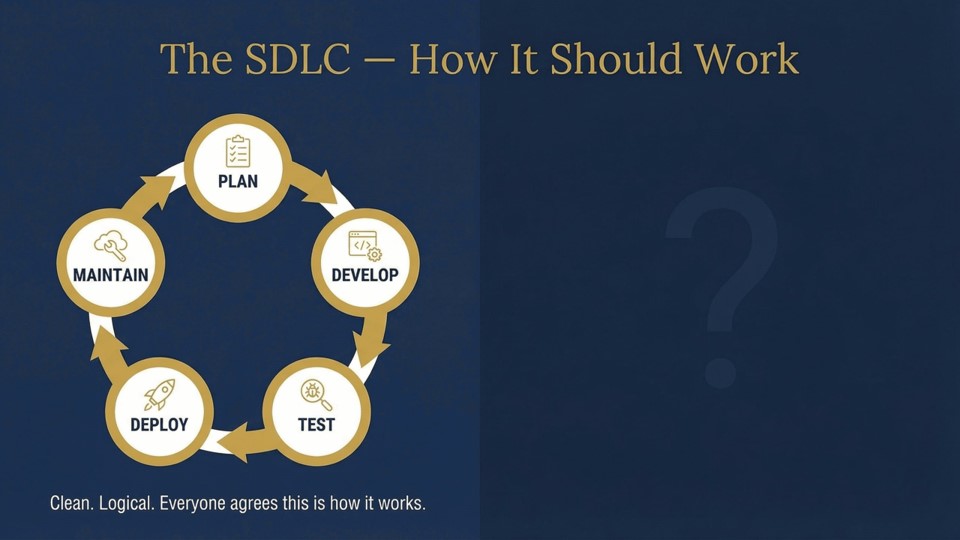
Fig. 3. The SDLC as it should work. Clean. Logical. Everyone agrees this is how it works.
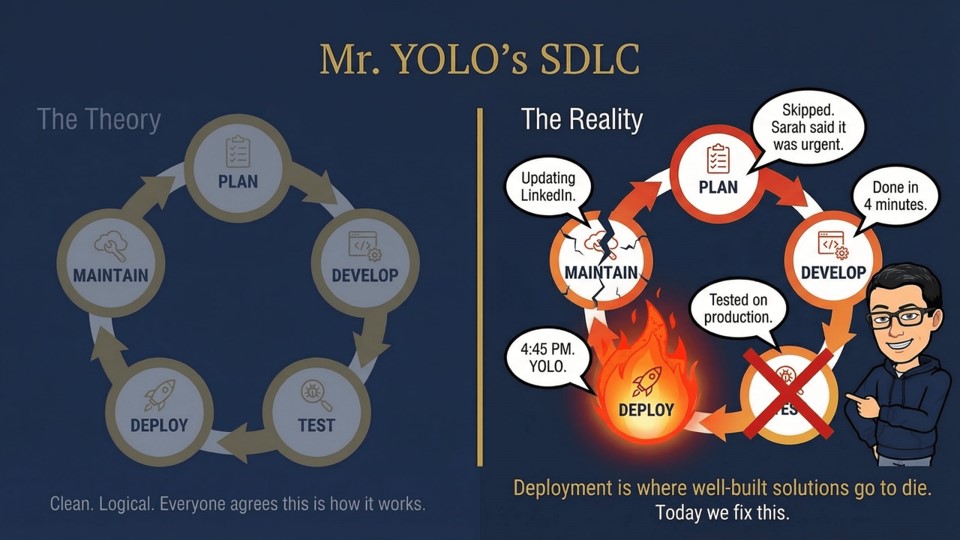
Fig. 4. Mr. YOLO's version. Deployment is where well-built solutions go to die.
Plan: Requirements, architecture, decisions. This is where environment strategy belongs. Not after the first sprint. Not "once we know what we're building." Before anything else. The decisions made here are largely irreversible.
Build: Development. Your dev environment is the workspace. This is where months of work happen: sprints, code reviews, demos, iterations.
Test: System integration testing, UAT, sign-off. Your test and UAT environments live here. Business users are in the system. The client is forming opinions about the product.
Deploy: Moving the solution to pre-production and production. This is where environment mistakes surface. The wrong URL. The missing security group. The toggle that can't be enabled. All of it shows up here, after months of work, when there's no time to fix it cleanly.
Maintain: Live operation. Monitoring, patching, hotfixes, new features. Your production environment lives here permanently. Every configuration decision you made in Plan is now load-bearing.
The insight is this: we're fixing the Deploy phase. But the decisions that break Deploy were made, or not made, in Plan. That's why this post exists before any of the pipeline or deployment posts. You cannot fix deployment problems with deployment tools if the environments themselves were set up wrong.
What Is an Environment, Actually
Before we talk about environment strategy in Power Platform, we need a clear answer to a question most developers have never been asked to articulate: what is an environment?
Think about a developer's physical workspace. They have a desk where they do their work, messy, in-progress, half-broken things everywhere, nobody else should touch this. Then there's a meeting room where they present, cleaned up, structured, ready for other people to see. Then there's the actual product that ships to customers, stable, tested, locked down.
An environment in software is the same idea, applied to a running application. It's an isolated container where your software lives at a specific stage of its lifecycle. You don't build in the same place you show clients. You don't test in the same place you run live transactions. You don't let everyone access everything at every stage.
In Power Platform, an environment is all of that, plus three things at once:
Fig. 5. A Power Platform environment is three boundaries in one: security, deployment, and licensing. All decisions made at creation time.
Security Boundary
Access to a Power Platform environment is controlled in three layers, each answering a different question.
Licensing Boundary
What an environment can do, and what it costs, depends on the licenses of the users and the environment's own settings.
| License | Build | Run apps & flows | Premium connectors | Managed Env |
|---|---|---|---|---|
| Developer Plan | ✅ Yes | Dev environments only | ✅ In dev envs | ✗ |
| Power Apps Premium | ✅ Yes | ✅ Any environment | ✅ Yes | ✅ Yes |
| Power Automate Premium | ✅ Yes | ✅ Any environment | ✅ Yes | ✅ Yes |
| Dynamics 365 (qualifying) | ✅ Yes | ✅ Within D365 scope | ✅ Yes | ✅ Yes |
| Microsoft 365 only | Limited (standard connectors) | Standard connectors only | ✗ | ✗ |
Deployment Boundary
Every environment has a specific role in the deployment chain. Solutions flow in one direction only, left to right, and every environment in the pipeline receives only managed solutions imported through Power Platform Pipelines, never manual changes.
Fig. 5b. A deployment pipeline — each stage is an environment. Solutions flow forward only, never backward.
And the critical part: most of the decisions that define these three boundaries are made at environment creation time and cannot be changed later. You can add Dataverse to an existing environment after the fact, but you cannot enable Dynamics 365 apps if that toggle wasn't set when the database was first provisioned. You can't change the region. These aren't settings, they're architecture choices baked into the environment at birth.
This is why environment strategy is an architecture decision. Not a configuration task. Not something you sort out in the first sprint. An architecture decision, made before anything else.
Single vs. Multiple Dev Environments
The first environment question every project needs to answer is: how many dev environments do we actually need? There are three models, and which one you pick depends on team size, governance maturity, and whether your workstreams can safely share a space.
Model 1: Shared dev environment
One environment, all developers inside it, solutions as the isolation mechanism. This is the default and the right answer for most projects. Small team, clear ownership of components, low risk of developers breaking each other's work. Everything converges at Test/SIT for the first time before moving up the pipeline.
Model 2: Personal Developer Environments (PDEs)
Microsoft's newer governance model: each maker gets their own private developer environment, provisioned automatically, locked to their identity. Makers work in isolation, then promote through the shared pipeline when ready. PDEs don't consume tenant capacity, they're provisioned from the Power Apps Developer Plan and governed centrally via Managed Environments. This is the right choice for tenants with many makers, mixed skill levels, or strict governance requirements where shared dev environments create too much noise.
Model 3: Multiple shared dev environments
Two or more team-scoped dev environments, each owned by a distinct workstream, all converging at a shared Test/SIT. Use this when two teams are moving at genuinely different speeds on genuinely independent work that cannot safely share a dev environment without breaking each other.
Fig. 6. Single vs. multiple shared dev environments. Both converge at Test/SIT, that's where integration is validated for the first time.
When multiple shared dev environments are actually justified
Parallel workstreams with different rhythms. Two teams moving at genuinely different speeds on genuinely independent pieces of work. Team A owns the canvas app and Dataverse model. Team B owns an integration layer: external APIs, data sync, event-driven flows. Team B's half-wired integrations constantly break Team A's app testing in a shared environment. Give each team their own dev environment; they converge at Test/SIT where the full solution is assembled and validated for the first time.
Base product + consumer project built simultaneously. You're building a reusable managed solution that other projects will consume. A second team is building the first consuming project on top of it at the same time. They can't share dev because the base layer is actively changing under the consuming layer. The base gets its own dev environment, the consumer gets theirs, and they meet at Test where the import chain, base first then consumer, is validated end to end.
Hotfix while feature development is in flight. Production breaks. You need a clean patch. But your dev environment has half-finished features that can't ship yet. If you only have one dev environment you're stuck, you can't build a clean hotfix without contaminating it with incomplete work. A hotfix track environment is the only clean answer. Not always planned upfront, but worth anticipating on long-running projects.
The pattern across all three: multiple dev environments exist to protect different lifecycles from each other. They're not about team size. They're about isolation when two workstreams genuinely can't share the same space without breaking each other. If that problem doesn't exist, and on most projects it doesn't, one shared dev environment is the right answer.
Your Environment Strategy Toolkit in Power Platform
Now that we understand what environments are and why they matter, let's look at the four platform features that define how you architect and govern them. These aren't advanced features, they're the baseline. Every serious Power Platform project uses all four.
Managed Environments: unlocks governance capabilities and is required for pipelines. Security Groups: controls who can access each environment. Environment Routing: prevents makers from landing in the default environment. Managed Capacity: gives you visibility and control over storage and consumption across environments. Together, these four features are your environment governance framework.
We'll go deeper on each of these as we encounter them in the sections below: Managed Environments in the topology section, Security Groups in Mistake 02, Environment Routing in Mistake 01, and Managed Capacity in the checklist. For now, know that these four exist, and that a project without all four configured is a project with governance gaps.
Why Environments Are an Architecture Decision
Most developers treat environments like parking spaces, you just grab one and start. But in Power Platform, every environment is a deployment boundary, a security boundary, and a licensing boundary all at once.
The choices you make when creating an environment are largely irreversible. You can't move a production Dataverse database to a different environment. You can't add Dynamics 365 apps to an environment that wasn't created with that option enabled. You can't change the region. These aren't settings you tune later, they're architecture decisions baked in at creation time.
So let's talk about what those decisions actually are.
The Environment Types You Need to Know
| Type | Dataverse | D365 Apps | Resettable | SLA | Use for |
|---|---|---|---|---|---|
| Default | ✅ Always | ✗ | ✗ | ✗ | Personal maker experiments only. Shared across your entire tenant. Never use for any team project. |
| Developer | ✅ By default | Optional | ✅ | ✗ | Personal sandbox per maker, backed by the Power Apps Developer Plan. Does not consume tenant capacity. Building and previewing is free; running apps and flows in other environments requires a premium license. Can be reset. Never use as a shared team environment. |
| Sandbox | Optional | Optional | ✅ Yes (wipes everything) | ✗ | Microsoft's recommended type for Dev, Test, and UAT environments. Purpose-built for non-production work. Can be reset, which is useful for refreshing a test environment between cycles, but wipes everything instantly with no recovery path if triggered carelessly. No SLA coverage. See the note below on the Sandbox vs Production-type tradeoff. |
| Production | Optional | Optional | ✗ | ✅ Full SLA | Microsoft's recommended type for production environments. Cannot be reset. Full daily backup, point-in-time restore, and SLA coverage. Some teams extend this type to their entire pipeline (Dev, Test, UAT, Pre-Prod) to eliminate reset risk at every stage. That is an opinionated choice, not Microsoft's standard guidance. See the note below. |
| Trial | ✅ Always | Optional | ✗ | ✗ | 30-day POCs only. Expires automatically, no extensions. Never use for real projects. |
Microsoft's standard guidance: use Sandbox for Dev, Test, and UAT; use Production for your production environment. Sandbox is purpose-built for non-production work, supports reset for refreshing test data between cycles, and costs the same as Production in terms of capacity. This is the right answer for most teams.
The case for Production-type everywhere: a Sandbox environment can be reset by any admin in the Power Platform Admin Center in seconds, one toggle, one confirm, no recovery path. On a long-running client project where months of test configuration and data sit in that environment, some architects prefer to eliminate that risk entirely by using Production-type for every pipeline stage. You also get SLA coverage and point-in-time restore at every stage, not just production. That is a legitimate risk management decision, but it is not what Microsoft recommends by default.
Either approach works. The choice depends on your team's Admin Center access controls and your appetite for reset risk. What is not optional: every pipeline environment needs a security group assigned, Managed Environments enabled, and DLP policies in place regardless of which type you choose.
The Environment Topology That Actually Works
For any serious Power Platform project, here's the minimum environment layout I recommend. Everything to the left is unmanaged, developers work there freely. Everything to the right receives only managed solutions, deployed through pipelines.
Fig. 7. Recommended environment topology. Dev is unmanaged; Test through Prod receive managed solutions only via pipeline.
Finance & Operations integration adds three hard constraints that must be decided before any environment is created. First, the Power Platform environment must be a Linked Environment: configured from the F&O side, this binds a single Power Platform environment to a specific F&O instance. Second, a Linked Environment must be a Managed Environment: not a recommendation, a prerequisite. Third, any environment used for F&O-connected development must have the Dynamics 365 apps toggle enabled at creation time: this is irreversible. Miss it and you are recreating the environment from scratch, migrating everything, and updating every integration.
Fig. 7b. F&O integration prerequisites — all three must be decided before the environment is created.
Managed Environments is a premium governance capability that unlocks features you need for any serious project: solution checker enforcement as a deployment gate, sharing limits on canvas apps, maker welcome content, environment-level analytics, and critically, the ability to use Power Platform Pipelines.
As of 2026, Pipelines require all target environments to be Managed Environments. This isn't a soft recommendation: if your Test, UAT, Pre-Prod, or Production environments aren't managed, you can't use pipelines to deploy to them. Plan for this upfront.
What Managed Environments does NOT automatically do: it doesn't turn itself on. You enable it per environment, in the Power Platform Admin Center, under each environment's settings. Users running apps or flows in Managed Environments must hold premium licenses: Power Apps Premium, Power Automate Premium, or qualifying Dynamics 365 licenses. This is enforced per user and is not automatically covered by standard or developer licenses. Microsoft began enforcement in June 2026.
If you're using Environment Groups, all environments assigned to a group inherit the group's Managed Environments rules automatically. This is the cleanest way to ensure consistent governance without configuring each environment by hand.
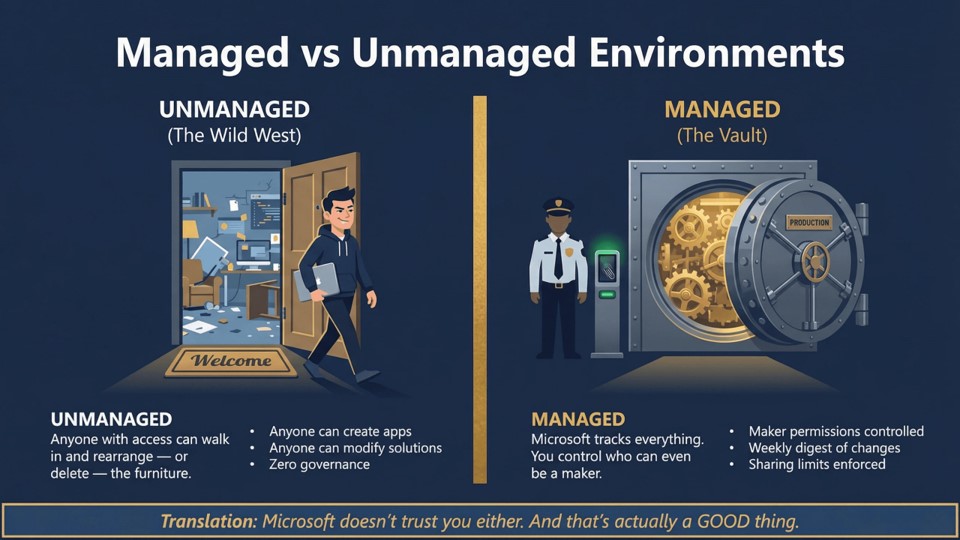
Fig. 8. Managed vs Unmanaged. Microsoft doesn't trust you either. And that's actually a good thing.
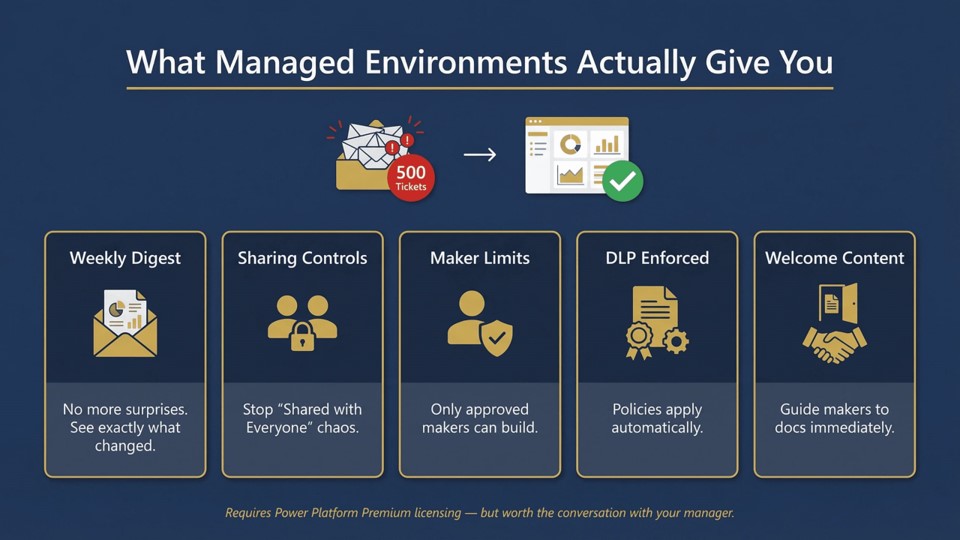
Fig. 9. What Managed Environments actually give you.
For projects that integrate with external systems, third-party ERPs, legacy APIs, Azure services, or Dynamics 365 apps, consider adding a dedicated Integration / Staging environment between Dev and Test. This gives you a stable, isolated target for integration testing that doesn't pollute your main test environment with data sync noise, incomplete reference data, or webhook misfires.
Environment Groups
Environment Groups let you assign multiple environments to a shared governance container. Managed Environments rules defined at the group level are inherited by every member environment automatically, no per-environment configuration required. The recommended split: one group for your delivery pipeline (Test + UAT + Pre-Prod + Prod), one for your development environments.
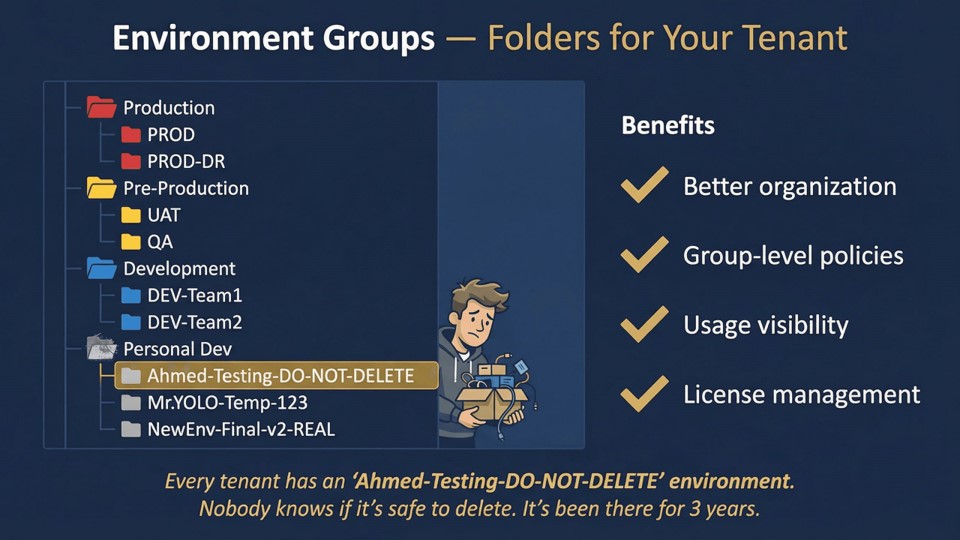
Fig. 10. Environment Groups. Folders for your tenant. Governance rules set once, inherited everywhere.
The Four Mistakes That Will Haunt You
Every one of these I've seen on real projects. Some I've made myself. I'm documenting them here so you don't have to learn them the same way.
Before we get into the specific mistakes, here's what bad looks like at different maturity levels, so you can recognize where you or your team currently sits.
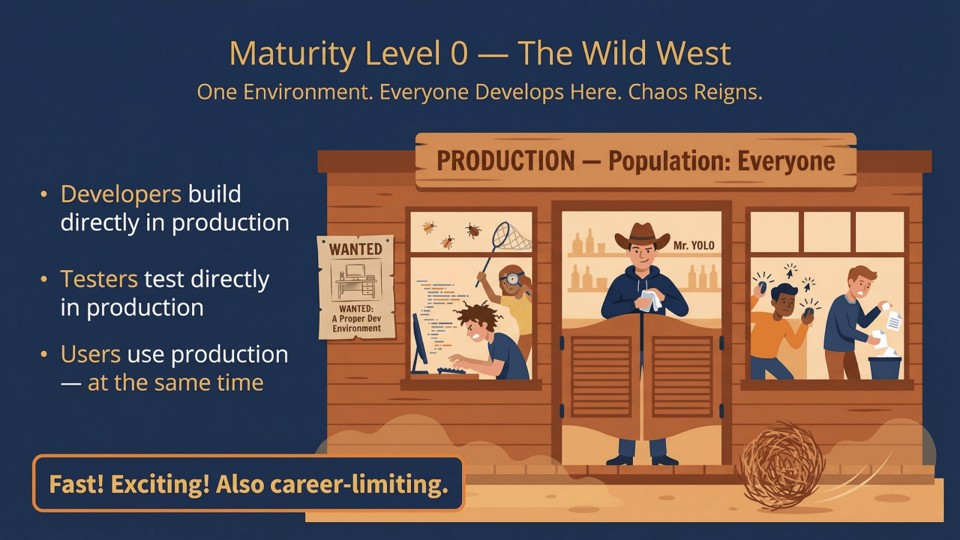
Fig. 11. Maturity Level 0. The Wild West. One environment. Everyone develops here. Chaos reigns.
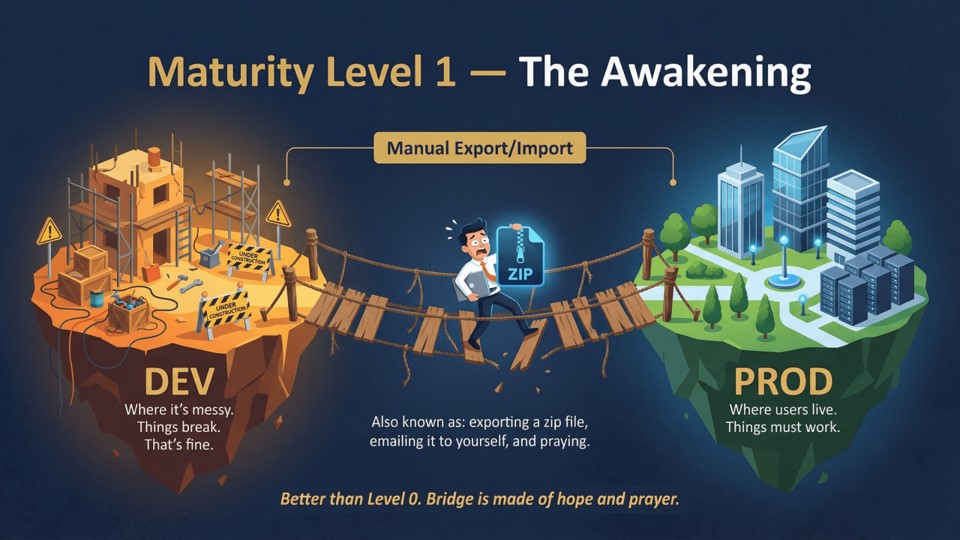
Fig. 12. Maturity Level 1. The Awakening. Manual export/import. Bridge is made of hope and prayer.
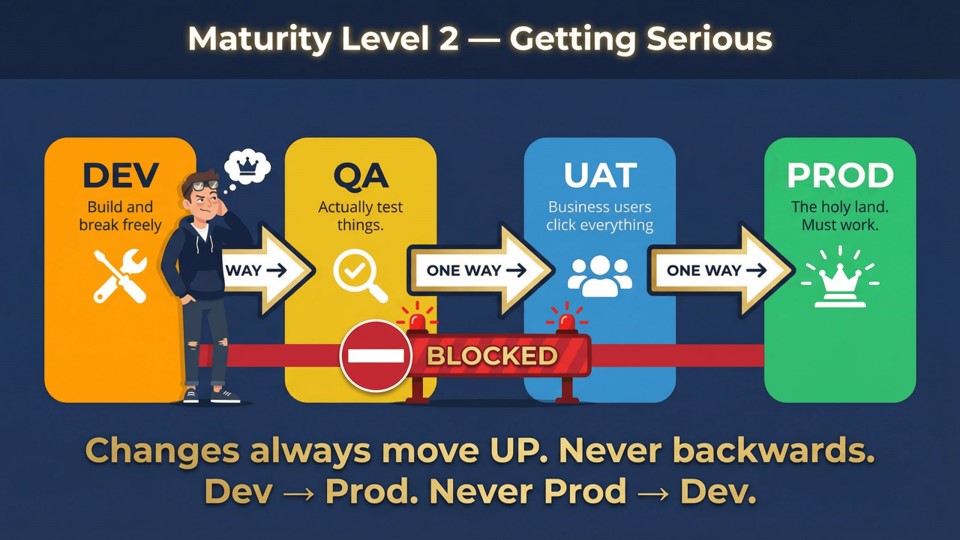
Fig. 13. Maturity Level 2. Getting Serious. Changes always move up. Never backwards. This is the minimum acceptable baseline.
The default environment is always there, always accessible, and always a trap. It's shared across your entire tenant. Every licensed user can see it. There are no security groups, no deployment boundaries, and no clean way to move what you build out of it later.
I've seen teams build entire applications in the default environment because it was "just a proof of concept," and then the client loved it and wanted it in production. The migration is painful. Budget two to three weeks you didn't plan for, on work that produces nothing new.
Create a dedicated environment for every project from day one. Reserve the default environment for individual, personal experimentation only, and enforce what can and cannot be built there with a DLP policy.
For tenants with multiple makers, the better answer is Environment Routing:a tenant-level setting that automatically redirects any maker who visits the Power Apps or Power Automate portal into their own personal developer environment, instead of the default. The default environment stops being a dumping ground by default, without relying on everyone reading a governance policy and doing the right thing. Enable it in the Power Platform Admin Center under Tenant Settings.
When you create an environment without assigning a security group, every licensed user in your tenant can access it. Developers stumble into UAT. Users access test environments with incomplete configurations. The client's CEO logs in to a sprint-in-progress. There's no boundary, because you didn't create one.
Fig. 14. Without a security group, the environment has no access boundary. Every licensed user in the tenant can walk in.
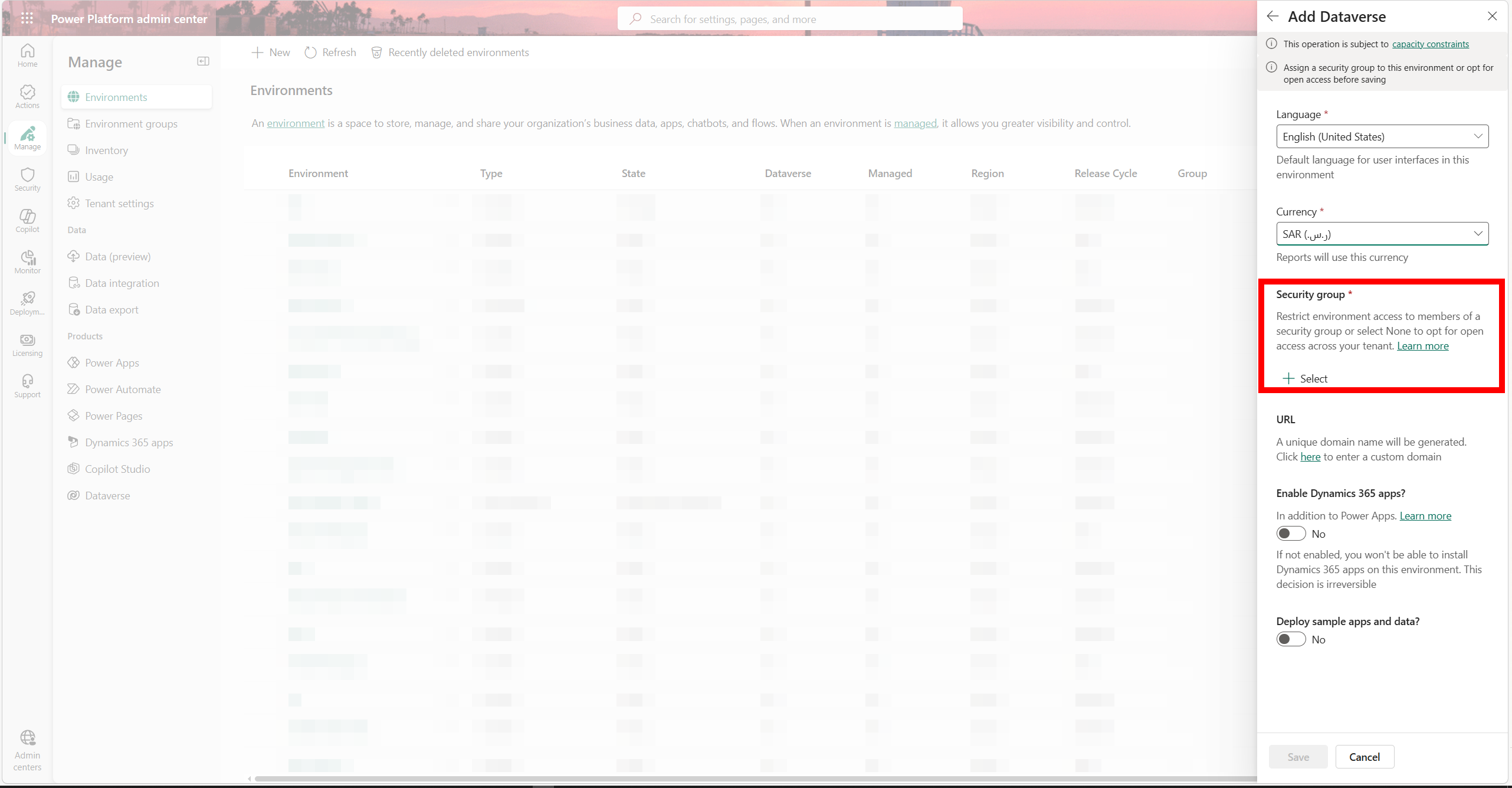
Fig. 15. The security group field in Admin Center. Create the group in Entra ID first, then assign it here at creation time.
Before you create the environment, create the security groups in Entra ID. Name them consistently: PP-[Project]-[Env]-[Role], e.g. PP-Contoso-UAT-Users. Assign them at environment creation time. If you skip this and add a security group later, every user currently in the environment without a proper license or role assignment gets removed, an unplanned access-restoration exercise mid-project.
This is the irreversible one. When creating a Dataverse environment, there's a toggle to enable Dynamics 365 apps. Most people skip it because they're "just building a Power App." Then six months later, the client wants to add Dynamics 365 Sales, or integrate with F&O, or install a Dynamics-dependent solution.
You cannot enable Dynamics 365 apps on an existing environment that was created without this option. You have to create a new environment, migrate everything, and update every integration. I've seen projects delayed by weeks because of this single skipped toggle.
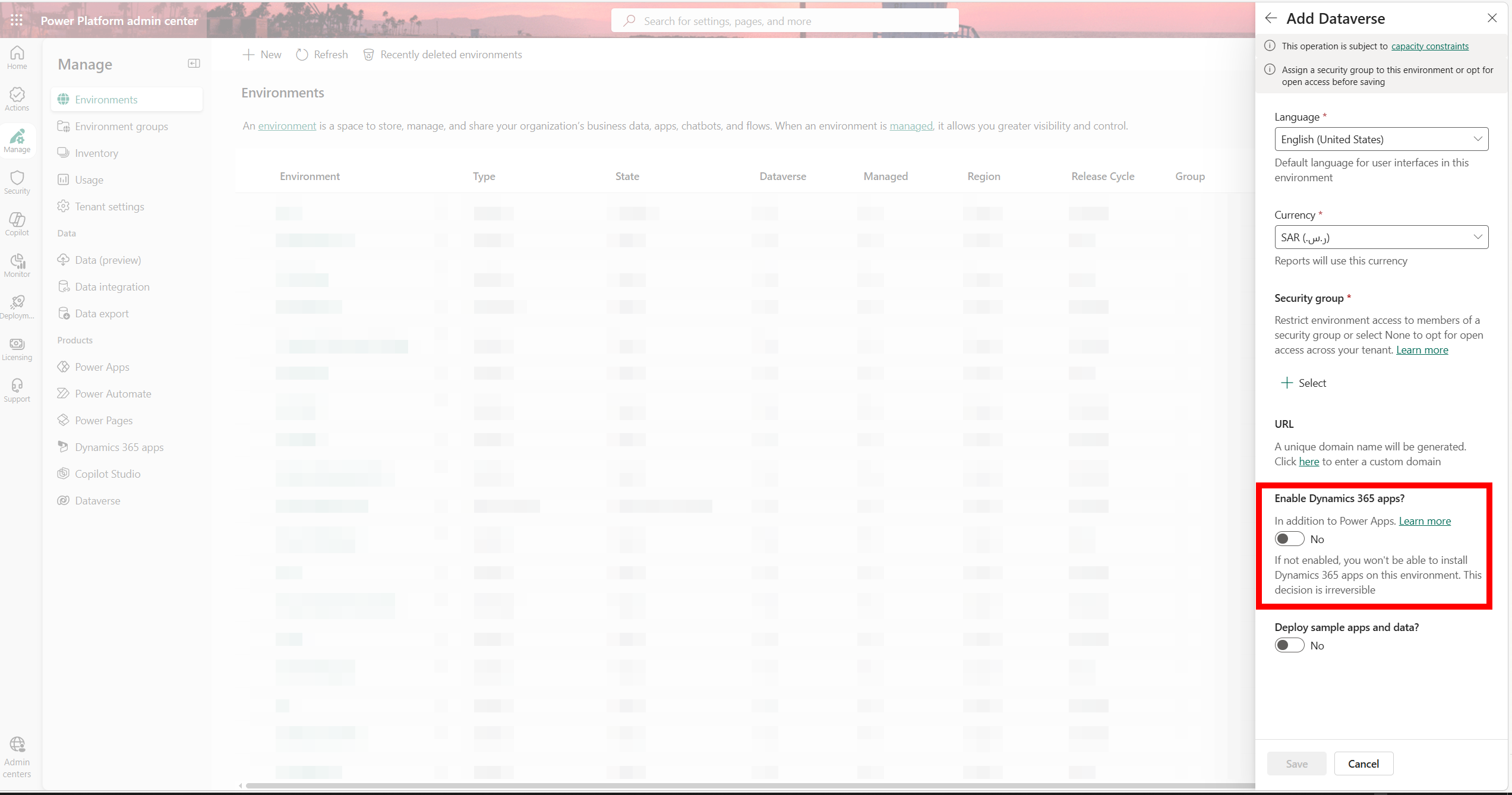
Fig. 16. The toggle is off by default and cannot be changed after environment creation.
A client was six months into a Power Apps build when the business decided to add Dynamics 365 Sales. The environment had been created without the toggle enabled. We spent two weeks planning and executing a migration: recreating the environment, re-importing every solution, updating every integration endpoint, reassigning security roles. Two weeks of engineering time, no new functionality delivered, go-live pushed back a month. All for a checkbox that takes three seconds to enable at creation time.
Enable it if there is any chance, any chance at all, that Dynamics 365 apps will be needed. The cost at creation time is zero. The cost of not enabling it is measured in weeks.
When you create an environment, Power Platform auto-generates an organization URL, something like org2032013.crm4.dynamics.com. Nobody changes it because nobody notices it. And then it ends up in production: in API calls, in documentation, in client-facing URLs, in the browser bookmarks of every user on the project.
Six months into the project, someone asks for the environment URL. You send it over. They look at it and say: "is this really what's going into the integration config? Into the client's documentation?"
Changing it is possible from the Admin Center. But every integration that references the old URL breaks the moment you do. Every bookmark, every API config, every piece of documentation needs updating. The URL itself is easy to change. The blast radius isn't.
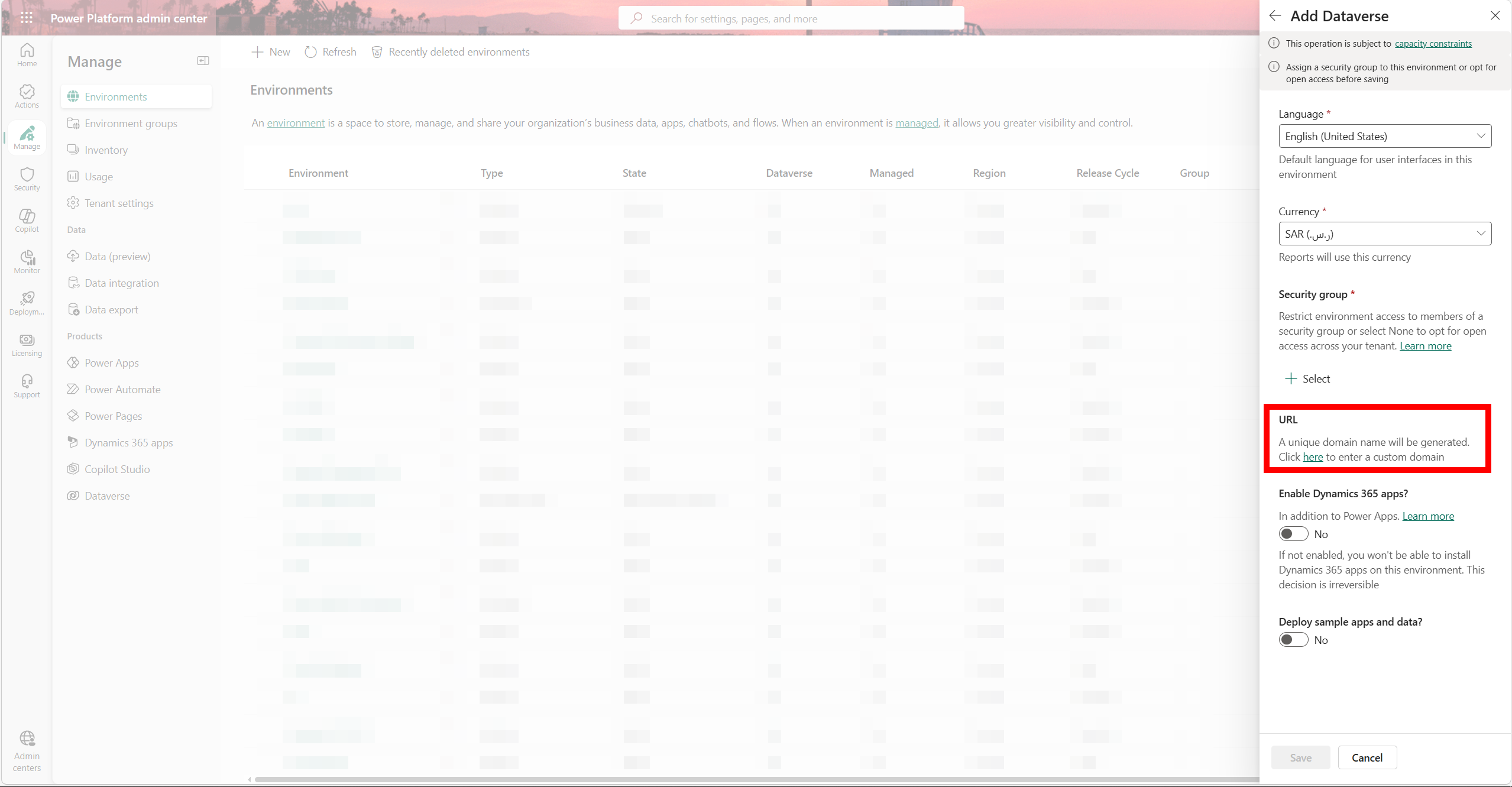
Fig. 17. The org URL field in Admin Center. Set it manually at creation time.
Always set the URL manually at creation time. Use a consistent naming convention: [client]-[env], e.g. contoso-dev, contoso-uat, contoso-prod. Two minutes of work, permanent benefit.
The Fifth Mistake Nobody Talks About: No DLP Policy
I said four mistakes. There's a fifth one I left off the numbered list because it doesn't happen at environment creation time, it happens in the two hours after. And by then, makers are already inside the environment, building things, connecting things, and moving data in directions you haven't thought about yet.
Data Loss Prevention policies are as foundational as the environment itself. A DLP policy defines which connectors are available in an environment, which ones can work together, and which ones are blocked entirely. No DLP policy means makers can build flows that send your Dataverse customer records to a personal Gmail account, pull data into a public-facing HTTP endpoint, or connect internal systems to consumer services that have no place near your data.
How DLP policies work
Every connector gets assigned to one of three buckets: Business, Non-Business, or Blocked. Connectors from different buckets can't be used together in the same app or flow. You configure policies at two levels:
Tenant-level policy: applies to all environments. Use this for universal high-risk blocks: personal email, social media, consumer storage. This is your wall.
Environment-level policy: applies to a specific environment only. Use this to restrict further or allow specific connectors for a project's needs. Environment-level policies can only make things more restrictive than the tenant policy, they cannot grant permissions the tenant policy has blocked.
What to do before you hand the environment to a maker
Define your DLP policy before a single maker has access to the environment. Starting position for most projects: put all Microsoft/Dataverse connectors in Business, move all third-party and consumer connectors to Blocked, then work with your integration requirements to move specific connectors to Business as needed. Lock the default group to Blocked so any new connector added by Microsoft lands in the restricted bucket until you explicitly approve it.
The default environment needs the most restrictive DLP policy in your tenant, it's accessible to everyone and is exactly where an untrained maker will go if Environment Routing isn't enabled.
DLP is a continuous process, not a setup-and-forget step. New connectors are added to the platform regularly. Make reviewing your DLP policies part of your project governance cadence.
DLP governs which connectors makers can use. VNet integration via Managed Environments goes further: it locks outbound Power Platform traffic to your own Azure Virtual Network instead of shared Microsoft infrastructure. You need this in regulated industries, when handling sensitive data, or when enterprise clients won't accept shared egress. A full breakdown of VNet setup and network security hardening is coming in a dedicated post in this series.
The Pre-Start Checklist
Before you create a single environment on your next project, go through this list. It takes less than 30 minutes and prevents all of the above entirely.
A well-configured environment takes a few hours of deliberate work across a few people: architect, Entra admin, Power Platform admin. The decisions made in that window are largely permanent. A poorly-set environment doesn't just cost you time at go-live. It costs you credibility, client trust, and sometimes the project. This is where quality starts.
What's Next
You now have environments that are configured correctly, secured, and ready for a team to work in. The next question is: what can they build, and what can they connect?
In Post 02, we'll cover DLP policies in depth. What they are, how the connector buckets work, what a tenant-level policy should look like on day one, and the one configuration decision that will save you from a data breach you didn't know was happening. It's the logical next step after getting your environments right.
If you've seen environment setup go wrong in ways I haven't covered here, find me on LinkedIn.